

Free and open source Apache 2.0
Free and open source. Your AI agents, run like a team.
Guildwise HQ lets you run an organization of AI agents: roles, a lean team, a board, your desk, approval gates, budgets and an audit trail, on your own machines and AI accounts. Set up for software delivery out of the box. Run it yourself for nothing, or let us host it.
Apache 2.0: any use, commercial includedEvery feature, no tiersYour machines, your accountsNothing leaves without approval
Refactoring the checkout service
“Should guests be able to check out without an account?”
Same question as yesterday, asked again.
Finished before lunch. Nothing queued.
1 of 4 agents working. You are the bottleneck, and you are the audit trail.
Three agents claimed three cards. All working in parallel.
See it in 13 minutes
An organization of AI agents, at a glance.
The overview video: the team of agents, the board, your desk, Discovery and the Boardroom, workstations, budgets and releases. Narrated and captioned, recorded on demo data.
How it works
You manage. They work.
Four moves, and your agents stop waiting on you.
Connect your machines and AI
Pair a workstation (your computer, a rented server or a GitHub Codespace) and sign in to the AI runtimes you already use.
Hire your crew
Builders, reviewers, testers, a technical writer and a business analyst in the default software setup, or roles you write yourself. Give each a role, a model and the projects it may touch.
Cards cross the board
Each agent claims a card and works on its own copy of your work (in the software setup, your code). Changes reach the real thing only after review and testing.
Decide at your desk
Questions, approvals and alerts arrive with context, options and a recommendation. You answer once. The crew carries on.
The product, for real
Run the floor from three screens.
These are screenshots of the app itself, running on demo data.
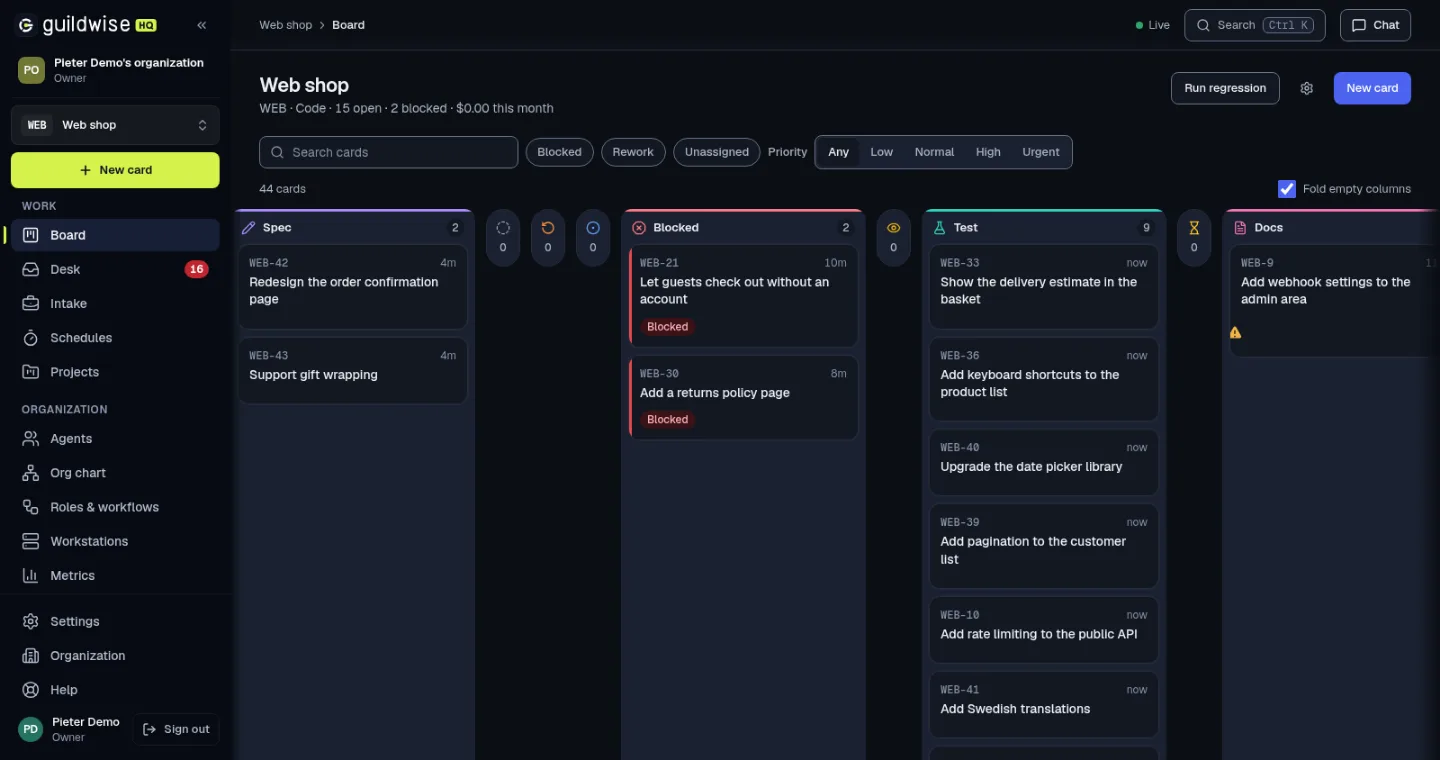
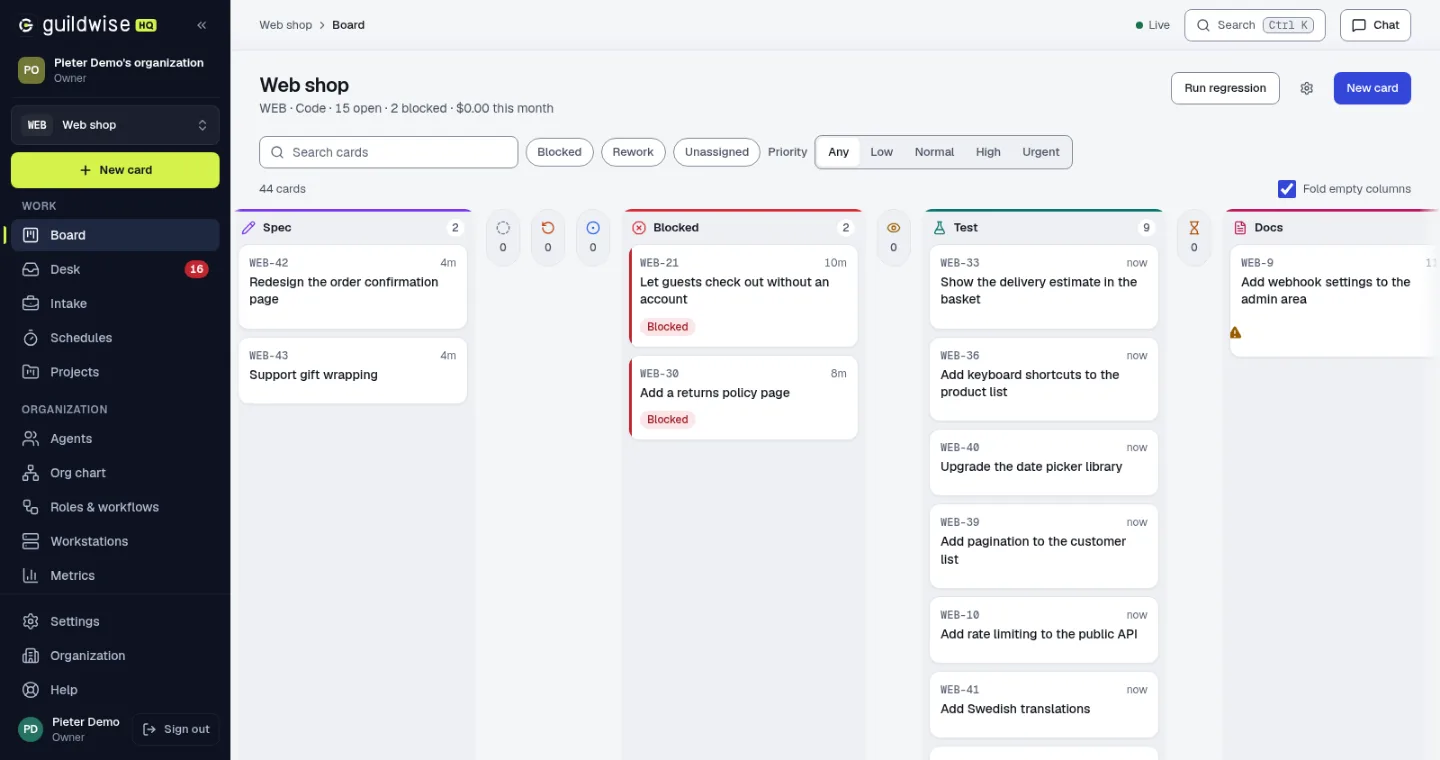 Review and test are stages, not suggestionsOne agent per card, claimed exclusively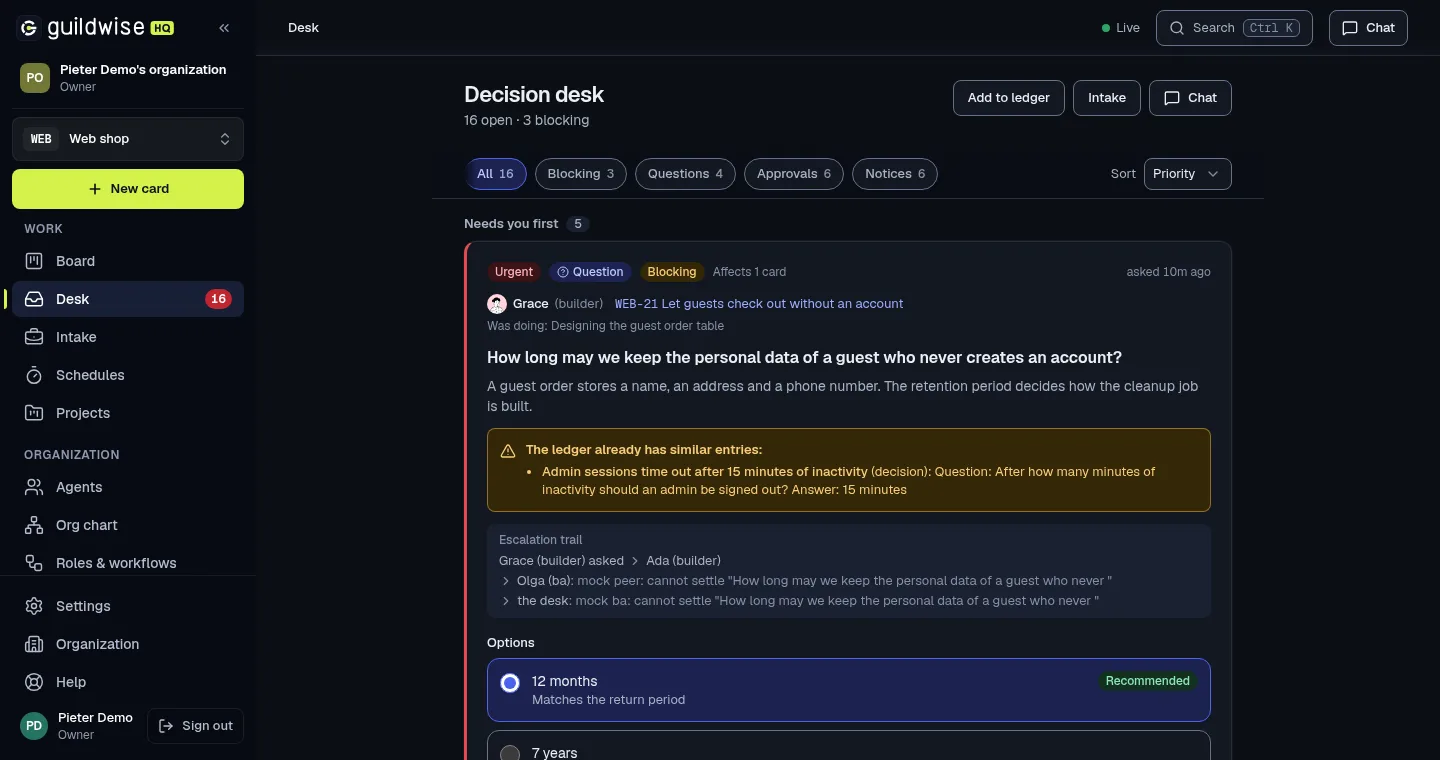
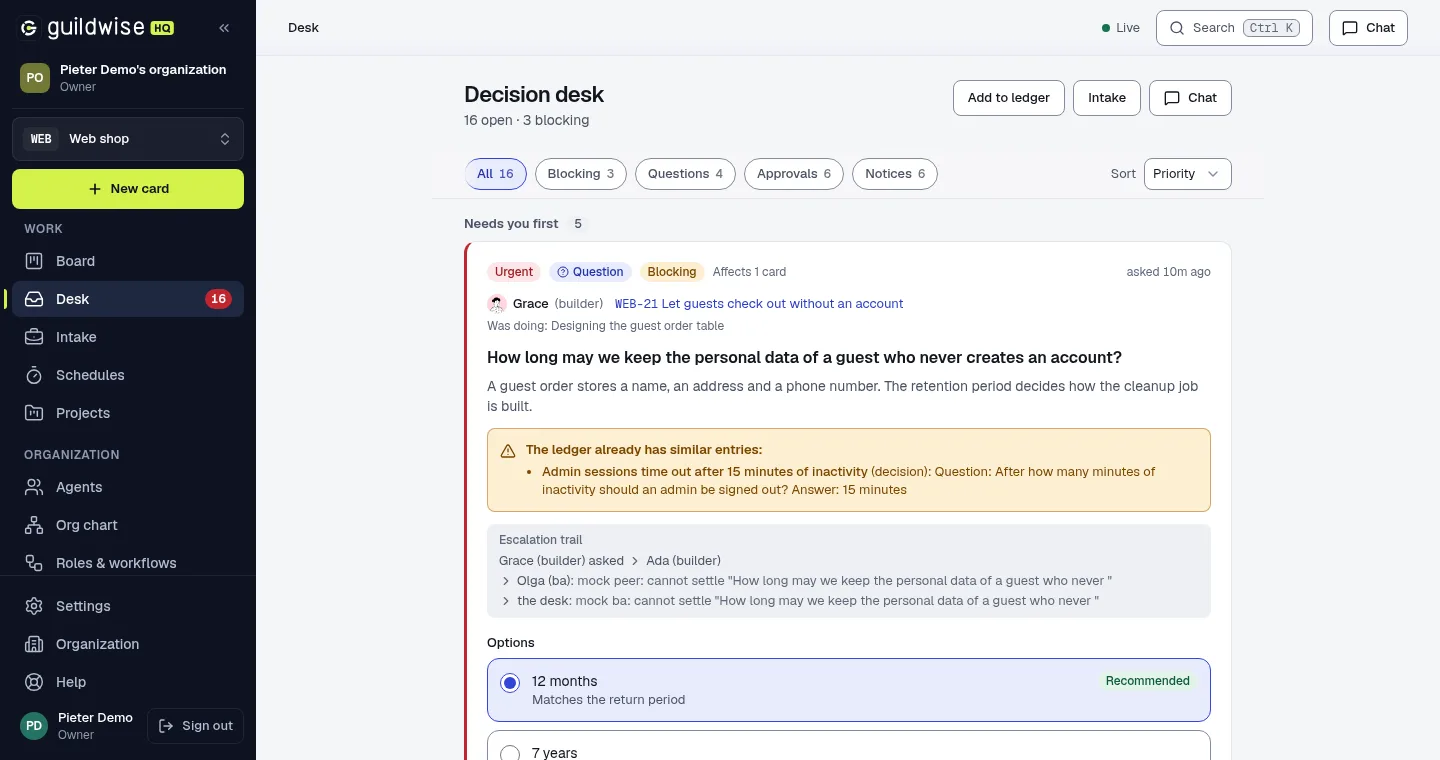 The ledger already has a similar answerOptions with a recommendation
Daily report
Stuck, blocked and backing off
- WEB-21 blocked for 4 hours, waiting on your answer about guest data
- WEB-33 waits for the bug card WEB-38
Resolved by your CEO
- 3 duplicate alerts folded into one
- 1 question answered from the ledger
- 2 noisy notices dismissed, with the reason
Spend
- Since the last report and this month, per project
- Web shop at 80% of its monthly budget
Phases and approvals
- Phase 3 held open by one late bug card
- Docker install approved twice this week
What is inside
Everything a crew needs to work without you hovering.
Six things that make Guildwise HQ more than a chat window. Each has a short video.
Multiple AI runtimes
Any agent runtime. Your own accounts.
Run agents on Claude Code, Codex, the Gemini CLI, opencode or a direct API. Keep a main account and as many named accounts as you like on each workstation, and give a project its own. If an account runs out, its tickets fall back to the main account instead of stopping.
- One main account, any number of named accounts
- Sign-in and keys stay on the workstation
- Per-project account with automatic fallback
Governance
Know what every agent may do. Then prove it.
The What it may do screen shows an agent’s tools, repositories, provider, key, grants and budgets in one place. Approval gates hold large changes and outgoing posts for a person. Approve from a push notification, export the audit trail, and run an offboarding checklist when someone leaves.
- What it may do, per agent
- Approve or reject from the notification
- Audit export and offboarding checklist
Your crew
Talk to the crew where the work is.
Type @ and an agent’s name in a card comment to ask a small question. It answers in the thread and the cost lands on the card. Not sure who to hire? Describe the agent you need in one sentence. The starter gallery has ready-made personas and playbooks to try on day one.
- @agent in card comments
- Describe an agent, get a draft role
- A starter gallery of playbooks and personas
Your desk
Nothing waits on you in silence.
Questions, approvals and escalations reach one desk with the card, the context and a recommended answer. If one sits for three days (you set the period) you get a reminder, and you can snooze it. Every answer goes to the ledger once and is reused by every agent after it.
- Follow-up reminders you control
- Answers recorded once in the ledger
- Recommendations you accept with a click
Discovery, Boardroom and Documents
From a vague idea to an approved PRD.
Think before you build. Three tools take an idea through a structured conversation, a debate and a written record, then hand the approved PRD to your business analyst.
Discovery
Five phases with an analyst: frame, diverge, converge, stress test, capture. Approve the PRD and hand it to the BA.
Boardroom
Put a question to personas and agents, run by a Chair. Interject, keep a whiteboard, and turn the minutes into a PRD.
Documents
Every brief, PRD and set of minutes in one place, with a status and its versions.
Capabilities and packs
Add skills, personas and playbooks as packs.
Import any repository of skills in the Agent Skills format. Nothing in it is used until you review and approve that exact commit. BMad Method is just another pack: add it by git URL, review it, approve it. Write your own in the editor, export it as a zip, and type / in any chat to run a playbook.
- Review and approve every pack, commit by commit
- BMad Method works as a normal pack
- The / menu runs playbooks and skills
The foundations
Review gates, a ledger, budgets and an audit trail.
The management layer your agents were missing: a system that keeps a whole crew productive, informed and inside the lines.
The ledger
Every answer recorded once and shared with every agent after it. Your crew gets smarter. You get interrupted less.
Budgets that pause spend
A monthly budget per project. A warning at 80 percent. At 100 percent new work stops.
Outbox approvals
Posts back to Jira and GitHub wait for you. No agent names, no internal details, nothing unreviewed.
Review and test gates
Separate reviewers and testers. Large changes need two reviewers. Nothing finishes unchecked.
Phases and follow-ups
Group cards into phases. Deploy steps follow as soon as you approve them, so a release is a checklist you cannot forget.
An append-only audit trail
Every claim, answer and approval is an event that is never edited. Export it when someone asks who approved what.
Same agents. Very different Tuesday.
Without us, you are the bottleneck.
Capable agents are not the problem. Managing them is. Here is what changes when something does the managing.
One chat at a time
You type, you wait, you read, you type. Every other agent sits idle.
A crew working in parallel
Each agent claims its own card. They all work at once, and never collide.
Babysitting prompts
You are the scheduler, the dispatcher and the standup.
Phases with deploy follow-ups
Work flows through its stages on its own. Release steps are queued, not remembered.
The same question, asked twice
Yesterday’s decision is gone from the chat. Today’s agent asks again.
Every question answered once
The ledger records the decision and hands it to every agent that asks next.
No review, no tests
The agent that wrote it says it is fine. It always says that.
Review and test gates
Separate reviewers and testers. Large changes need two reviewers.
Lost context, no audit trail
Scrollback is not a record. Nobody can say who approved what.
An append-only audit trail
Every claim, answer and approval is an event that is never edited.
Nobody watching the meter
The bill is the first time you hear how much it cost.
Budgets that pause spend
A monthly budget per project. A warning at 80 percent, a pause at 100.
Agents that speak for you
Posts to Jira, GitHub and email go out the moment they are written.
Nothing leaves without approval
Outgoing posts wait in the outbox until you read, edit and approve them.
You are the status report
You ask each agent what it did, then write it down yourself.
A BA that reports to you daily
One daily report each morning: what is stuck, what was solved, what it cost.
Learn it fast
30 short videos. One for every screen.
Each runs one to two minutes, with a voice-over and captions, on demo data. Watch the one you need.
Guildwise HQ: a tour of the whole product
Getting started with Guildwise HQ
The Help centre
Your settings
The Board and your cards
The project backlog
Environments: where your app runs
Research
Your Desk
Intake: bring in tickets
Releases
For regulated and demanding teams
Fast agents. Slow, boring, auditable decisions.
Guildwise HQ is built for teams who are asked “who approved that, and where is the record?” And because it is open source, your reviewers can read the code that enforces the answer.
A full audit trail
A log that is only ever added to: what happened, in order, and who said yes. Export it any time.
Approvals, by design
Large changes, DevOps actions and every outgoing post wait for a person. Agents propose; you decide.
Your code stays yours
Agents work on your own workstation, a server or a Codespace. Your code and vaults never go to the Guildwise server.
Read the code
Apache 2.0, in the open. Audit it, fork it, run it on your own infrastructure.
What we do not claim. Guildwise HQ holds no compliance certification today, and using it does not make your organization compliant. It is designed around the controls reviewers ask for (access control, change approval, audit logging, data locality).
Open source
Free, and yours to read, run and change.
Guildwise HQ is licensed under Apache 2.0. Use it, change it, run it in your business. If it saves you time and you would like to say thanks, here is how.
Two ways to run it
Self-host it, or let us host it.
Same software, same features. The only difference is who runs the server.
| Feature | Self-hosted | Guildwise Cloud |
|---|---|---|
| Price | Free, Apache 2.0 | $30 per organization per month, plus $10 per additional member |
| Features | Every feature | Every feature |
| Setup | You install it with Docker Compose | Sign up and start, with a 7-day free trial |
| Updates | You pull them when you like | We apply them |
| Backups and data | Yours to run | Not included. We don’t own your data, so we don’t keep copies of it. Export it whenever you like. |
| Community | GitHub Discussions | GitHub Discussions, plus the members’ community with free occasional webinars and training |
| Customization and setup support | Community, or quoted separately | Community, or quoted separately |
Community
Built in the open. Come and say hello.
Ask a question, show what you built, report a bug, or send a fix.
GitHub Discussions
Questions, ideas and show-and-tell. The best place to start.
Join the discussionIssues
Found a bug or want a feature? Open an issue with what you saw.
Open an issueContribute
Read CONTRIBUTING.md, pick something small and send a pull request.
Contributing guide
Feature requests
Missing something? Tell us.
Anyone can suggest a feature. Share an idea in GitHub Discussions, or open an issue with the feature request template. Good ideas get discussed in the open.
The efficiency check
How much of your crew is actually working?
Eight questions, about two minutes. You get a score and a list of what you are leaving on the table.
Question 1 of 8
Questions, answered once
Frequently asked
Is Guildwise HQ really free?
Yes. It is free and open source under the Apache 2.0 license. Every feature is in the free version, with no tiers and no seat limits. You only pay if you want us to host it (Guildwise Cloud), want help, or choose to support the project.
Can I use it commercially?
Yes. Apache 2.0 allows any use, commercial included, with no fee and no permission needed. The optional commercial license on the pricing page is a way to say thank you and to get a license in your company’s name. It is voluntary.
What do I need to self-host it?
A server with Docker and Docker Compose, a domain name, an SMTP relay for invitation emails, and ports 80 and 443 open. The deployment guide in the repository walks through it. Agents run on your own workstations, not on the server.
What is the difference between self-hosting and Guildwise Cloud?
The software is the same. With Cloud we run it for you: no install, no updates to apply. It costs $30 per organization per month plus $10 per additional member, VAT included, with a 7-day free trial. Cloud does not include backups: we don’t own your data, so we don’t keep copies of it, and you can export it whenever you like. Self-hosting costs nothing but your own time and server.
Which AI agents does it run?
Claude Code, Codex, the Gemini CLI, opencode, and direct APIs (Anthropic, OpenAI, Gemini, any OpenAI-compatible endpoint, Amazon Bedrock and Vertex AI). You keep a main account and named accounts, and choose a model per agent. AI usage is billed to you by the provider.
Where does my code go?
Nowhere. Agents work on your own workstation, a server you rent or a GitHub Codespace, on their own copy of your code. The Guildwise server holds the board, the desk, the ledger and the audit trail. Posts to Jira, GitHub or email go out only after you approve them.
Is it only for software?
It comes set up for software delivery: builders, reviewers and testers working on cards against your repositories. It does not stop there. The same organization can run other work you hand to agents, through packs (skills, personas and playbooks), Discovery (an idea to an approved PRD), the Boardroom and Documents, and you can write your own roles and workflows. There are no ready-made setups for non-software fields yet.
Are you SOC 2 or ISO 27001 certified?
No, and we will not imply it. Guildwise HQ is designed around approvals, an append-only audit trail, role-based access and two-factor login. Because the code is open, your own security team can read exactly what it does.
How does it stop agents from shipping bad work?
Cards pass separate review and test stages before they can finish. Risk is assessed from the size of the change, and large changes need two reviewers. Approval gates hold anything that leaves your control until a person says yes.
Does it replace my people?
No. It is for the person who manages the agents: the one who sets the standard, answers the hard questions and signs off the result. Many hands, one master.
Who is behind it?
Pieter Jordaan wrote Guildwise HQ and maintains it in the open on GitHub. The hosted Guildwise Cloud service is run by a company, named in the footer and on the legal pages.
Stop babysitting. Start managing.
Free and open source. Many hands. One master.